
Stolen device data protection fails most Australian small and medium-sized businesses long before anyone realises the laptop is gone. A device disappears from a conference room in Sydney, slides out of a bag on a Newcastle train, or goes missing from a Central Coast co-working space, and the organisation has no immediate response in place. The window between loss and action is exactly when attackers, or opportunistic thieves who know what they have found, extract the most value.
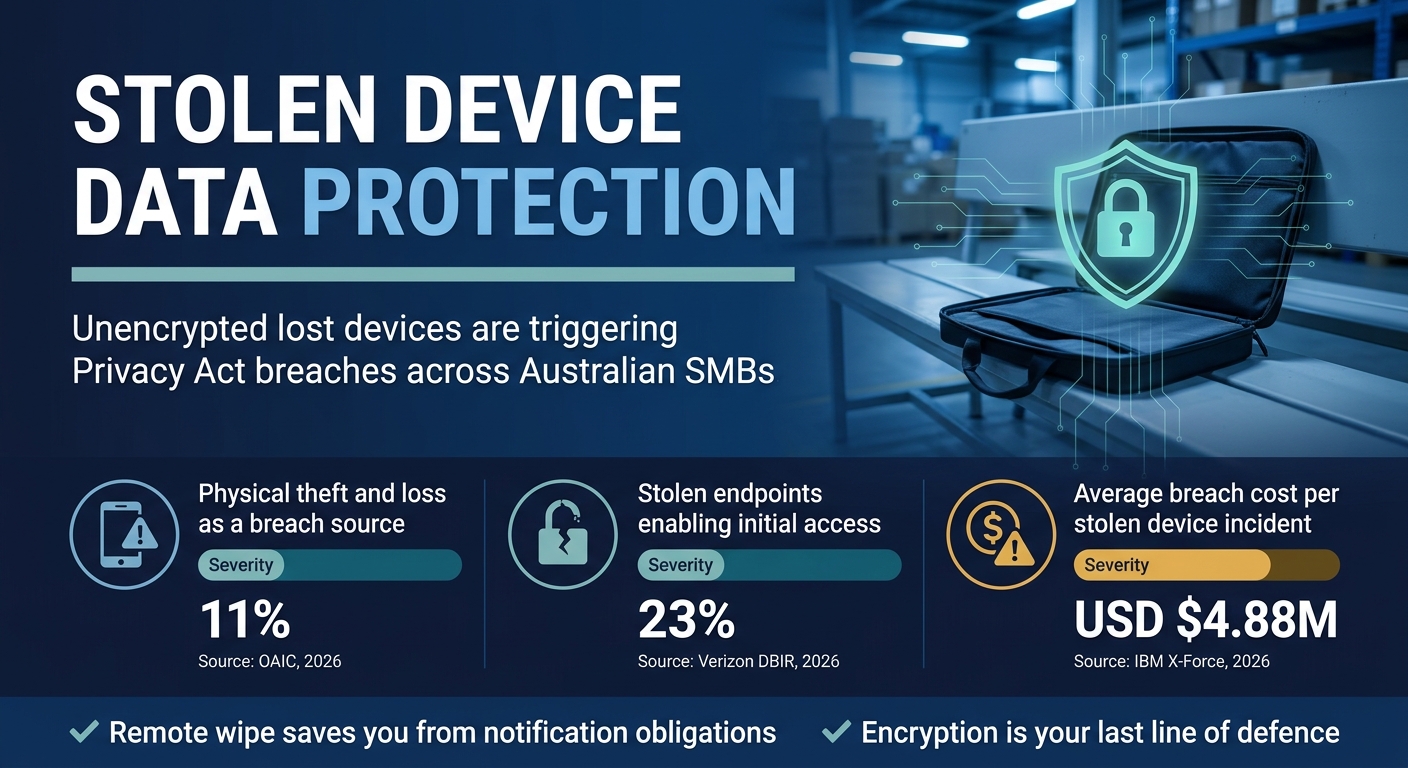
The numbers are sobering. Physical device theft and loss accounted for 11% of all Notifiable Data Breaches reported to the OAIC, 2026, ranking it among the top five breach categories for Australian organisations. For small businesses without mature endpoint controls, that statistic reflects a gap that is entirely preventable.
This post identifies the five most common gaps that leave Australian small and medium businesses (SMBs) exposed when a device goes missing, and explains what practical steps close each one.

Why Stolen Device Data Protection Fails Before You Notice the Device Is Gone
Most SMBs treat a missing device as a hardware problem first and a data problem second. That sequence is exactly backwards. The moment a device leaves your control, any data stored on it is potentially accessible to whoever holds it. The hardware cost is trivial compared to the regulatory and reputational exposure that follows an unprotected breach.
Credentials and sensitive data harvested from lost or stolen endpoints contributed to initial access in 23% of confirmed breaches analysed in the Verizon Data Breach Investigations Report. That figure illustrates a critical truth: the device itself is rarely the final target. It is the doorway to your systems, your cloud tenancy, and your client records.
The five gaps below are not theoretical. They represent the most common control failures that Adept IT Solutions observes across Hunter Region and Central Coast businesses that come to us after an incident. Addressing them proactively costs a fraction of remediation.
Gap 1: No Remote Wipe or Lock Policy Activated at the Moment of Loss
The first and most urgent gap is the absence of a tested, documented remote wipe or lock procedure. Many SMBs have Microsoft Intune or a similar mobile device management (MDM) tool licenced, but no one has confirmed that every enrolled device is configured to respond to a remote wipe command within minutes of a loss being reported.
The process must be simple enough for a non-technical manager to initiate outside business hours. If the only person who can trigger a remote wipe is your IT coordinator and they are unavailable on a Friday evening, the device sits accessible all weekend. Document the exact steps, assign backup responders, and test the wipe process quarterly.
For businesses running Microsoft 365 today, Intune provides selective wipe capability that removes corporate data while leaving personal data intact, which is especially important for mixed-use devices. The feature is included in many existing Microsoft 365 Business Premium licences and simply needs to be enabled and enforced.
Gap 2: Full-Disk Encryption Left Disabled or Inconsistently Applied
Full-disk encryption is the single most effective technical control for lost laptop data breach prevention. If BitLocker on Windows or FileVault on macOS is properly enabled and the recovery key is centrally stored, a stolen device is effectively unreadable without the credentials to unlock it.
The problem is inconsistency. A device purchased two years ago and enrolled in MDM after setup may never have had encryption enforced retrospectively. Fleet refreshes and new hires can introduce unencrypted endpoints that sit invisibly alongside properly configured machines. Without a compliance dashboard that actively reports encryption status, you are guessing at your own exposure.
The IBM X-Force Threat Intelligence Index found that the average cost of a data breach involving a lost or stolen unencrypted device reached USD $4.88 million globally. Regulatory penalties under the Privacy Act 1988 add further exposure in Australia. Encryption is not optional for endpoint data protection Australia-wide; it is a baseline expectation under the Australian Privacy Principles.
Our post on vulnerability management Australia blind spots covers related configuration gaps that compound unencrypted device risk across your fleet.
Gap 3: Shared Local Credentials That Survive Device Handover to a Stranger
Shared local administrator accounts are a persistent problem in SMB environments. When a device is lost, those credentials do not expire automatically. If the same local admin password is used across five laptops, a thief who recovers credentials from one device may be able to access others on the same network, or reuse them across cloud services.
The fix requires a combination of controls. Microsoft Local Administrator Password Solution (LAPS) randomises and rotates local admin passwords per device, breaking the lateral movement path. Combined with conditional access policies that block sign-in from devices not compliant with your MDM, a stolen device cannot authenticate against your environment even if credentials were exposed.
Reviewing credential hygiene is also relevant to secure remote access mistakes that many Hunter Region and Newcastle businesses overlook. The same shared credential patterns that create device theft risk also enable unauthorised remote access long after the device itself has been recovered or wiped.
Gap 4: No Notifiable Data Breach Assessment Process Triggered by a Missing Device
Under the Notifiable Data Breaches (NDB) scheme, organisations covered by the Privacy Act 1988 must assess whether a lost or stolen device constitutes an eligible data breach and notify the Office of the Australian Information Commissioner (OAIC) and affected individuals if the threshold is met. The assessment must be completed within 30 days of becoming aware of the incident.
Most SMBs do not have this process documented at all. When a laptop goes missing, the instinct is to replace the device and move on. That response ignores the legal obligation to determine what data was on the device, whether it was accessible without authentication, and who may have been affected.
The OAIC Notifiable Data Breaches scheme provides published guidance on the assessment process. Building a simple decision tree into your incident response playbook, covering what data classification was present, whether encryption was active, and whether remote wipe was executed, satisfies your assessment obligation and creates an audit trail that demonstrates due diligence.
Our coverage of the ASD Essentials Framework changes explains how updated compliance expectations in 2026 also affect how SMBs should document and respond to physical device incidents.
Gap 5: BYOD and Contractor Devices Sitting Outside Your MDM Visibility
Bring Your Own Device (BYOD) arrangements and contractor-owned hardware represent the most significant blind spot in stolen device data protection for SMBs today. If a contractor’s personal laptop connects to your Microsoft 365 environment and accesses SharePoint or email, sensitive business data may be cached locally on a device you have no visibility over and no ability to wipe.
The solution is not to prohibit BYOD entirely, but to enforce conditional access that restricts what data unmanaged devices can access. Microsoft Entra ID conditional access policies can block unmanaged devices from downloading attachments or accessing high-sensitivity SharePoint sites, limiting the data exposure even if the device is never enrolled in MDM.
For contractors specifically, requiring that they access your environment via a managed virtual desktop or a compliant application wrapper prevents corporate data from persisting on their local hardware. This is particularly relevant for Sydney and Central Coast businesses with distributed workforces and multiple active contractors at any given time.
The risks are closely related to the patterns discussed in our post on secure file sharing at work, where unmanaged access to shared business data creates compounding exposure across both physical and digital attack surfaces.
The Australian Cyber Security Centre recommends that organisations implement application control and device compliance policies as priority measures for managing unmanaged endpoint risk, guidance that applies directly to BYOD and contractor device scenarios.
“A missing device is not a hardware incident. It is a data incident with a legal clock running from the moment you become aware of it. The businesses that recover fastest are those that already have the response process documented before anything goes missing.”

Building a Stronger Approach to Stolen Device Data Protection
Effective stolen device data protection is not a single product or policy. It is a layered approach that combines full-disk encryption, MDM enrolment and compliance reporting, remote wipe procedures, credential hygiene, and a documented NDB assessment process. Each layer compensates for weaknesses in the others.
SMBs operating across Newcastle, the Hunter Region, and Sydney increasingly face audit expectations from clients, insurers, and industry bodies that require demonstrable endpoint controls. The five gaps outlined above are the starting point for any honest assessment of where your current posture falls short.
Reviewing your approach to cloud backup compliance mistakes alongside your device security posture ensures that even if a device is wiped or lost permanently, your data remains recoverable and your business continues without disruption.
The cost of prevention is measurable. The cost of a notifiable breach involving an unencrypted, unmanaged device is not. Adept IT Solutions helps Australian SMBs build practical, right-sized endpoint security programmes that address stolen device data protection without the complexity of enterprise-scale deployments. Contact Adept IT Solutions today to arrange a confidential review of your current endpoint controls.
Frequently Asked Questions
Q: What is stolen device data protection and why does it matter for Australian SMBs?
A: Stolen device data protection refers to the combination of technical controls, policies, and response procedures that prevent unauthorised access to business data when a laptop, phone, or tablet is lost or stolen. For Australian SMBs, it matters because a missing device can trigger obligations under the Notifiable Data Breaches scheme, expose customer and employee records, and result in regulatory penalties. Without controls like full-disk encryption and remote wipe capability, any data stored locally on the device is accessible to whoever finds it.
Q: Does a lost laptop in my Newcastle or Hunter Region business require a Privacy Act notification?
A: It depends on what data was accessible on the device. If your business is covered by the Privacy Act 1988 and the lost device contained personal information that was not encrypted or was otherwise accessible without authentication, you are required to conduct an eligible data breach assessment within 30 days. If the assessment determines that the breach is likely to result in serious harm to any individual, you must notify the OAIC and the affected individuals. Full-disk encryption that was active at the time of loss significantly reduces your notification obligation, which is one reason IT security Newcastle specialists consistently recommend it as a baseline control.
Q: How do I protect data on contractor and BYOD devices that connect to my business systems?
A: The most practical approach is to implement conditional access policies through Microsoft Entra ID that restrict what unmanaged devices can do within your environment. You can prevent attachments from downloading, block access to sensitive SharePoint libraries, and require compliant device status before granting access to business applications. For contractors with ongoing access, consider requiring them to use a managed application wrapper or access your environment through a virtual desktop that keeps data off their local hardware entirely. This approach is a core part of effective endpoint data protection Australia-wide.
Q: How often should we test our remote wipe capability to maintain good stolen device data protection?
A: Remote wipe capability should be tested at least quarterly as part of your endpoint security review. Testing should confirm that the wipe command reaches the enrolled device within your target response time, that the recovery key is correctly stored and accessible, and that the process can be initiated by a backup responder outside business hours. Many businesses discover during their first real incident that the device was not properly enrolled, the response contact was unavailable, or the wipe command had no route to the device because it was offline. Regular testing eliminates these surprises before a real loss event forces the issue.
Get in touch with our team of IT experts today! You can contact us via phone at 1300 423 378 or email us at info@adept-it.com.au.

