
Microsoft 365 today looks dramatically different from the platform Australian small and medium-sized businesses (SMBs) signed up for even two years ago. Artificial intelligence (AI) is now embedded at the core, pricing structures have been restructured, security capabilities have expanded, and governance expectations have sharpened. For businesses across Newcastle, the Hunter Region, Central Coast, and Sydney, keeping pace with these changes is no longer optional. It is a commercial and compliance necessity. This post breaks down what has actually changed, what it costs you, and what you need to do about it.

What Has Actually Changed Inside Microsoft 365 in the Last 12 Months
The pace of change inside the Microsoft 365 platform has accelerated significantly through 2025 and into 2026. Microsoft has shipped major updates across Teams, SharePoint, Exchange Online, and its entire security stack. Viva Insights has expanded, Loop is now embedded in mainstream workflows, and the admin centre has been reorganised around security and AI governance rather than simple application management.
For SMBs across the Hunter Region, these changes are not abstract. Teams Phone has matured into a credible alternative to traditional private branch exchange (PBX) systems, which has implications for businesses still running legacy VoIP security risks that many have not fully addressed. Meanwhile, SharePoint’s new data classification engine now scans documents automatically, flagging sensitive content under the Australian Privacy Act 1988 and related obligations.
Administrators who have not revisited their tenant configuration in the past 12 months are almost certainly running with default settings that no longer reflect current best practice. A configuration review is not a luxury for businesses serious about security.
Microsoft Copilot Is Now Built Into Microsoft 365 Today and That Changes Everything
Microsoft Copilot has moved from an optional add-on to a deeply integrated component of the Microsoft 365 experience. It is embedded in Word, Excel, Outlook, Teams, and PowerPoint. Depending on the plan, it is now included or available at reduced incremental cost. This is not a minor feature update. It fundamentally changes how staff interact with business data.
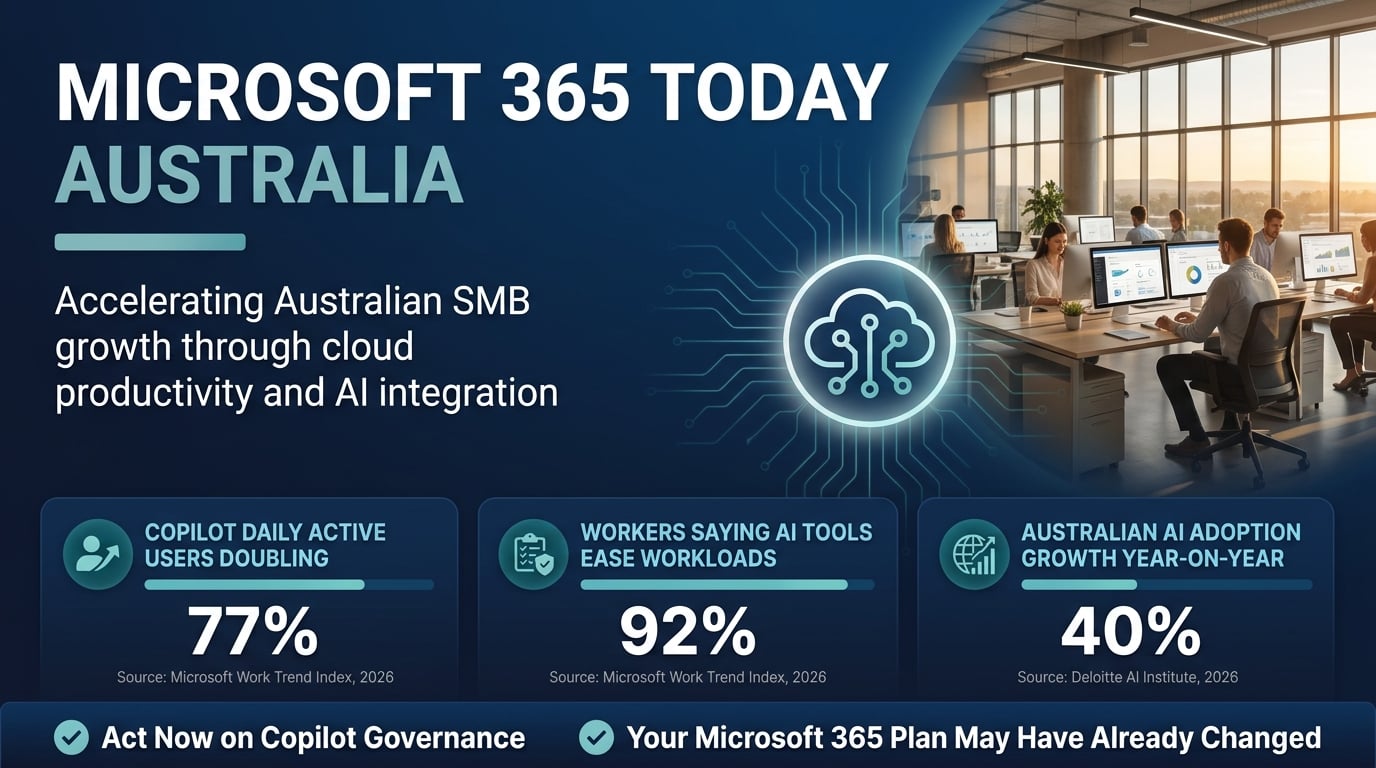
The adoption numbers are striking. According to the Microsoft Work Trend Index, 2026, 77% of Fortune 500 companies now use Microsoft 365 Copilot, with daily active users more than doubling in the six months to early 2026. That momentum is reaching Australian businesses faster than many expect.
The same research found that 92% of surveyed knowledge workers say AI tools have made their workloads more manageable, yet fewer than half report their organisation has a formal AI usage policy in place, as reported by the Microsoft Work Trend Index, 2026. That gap between adoption and governance is where risk accumulates quickly for SMBs.
Copilot draws on data already inside your tenant. If your permissions, data classification, and sharing settings are not properly configured, Copilot can surface sensitive information to users who should not have access to it. This is not a theoretical risk. It is a configuration problem that many businesses currently have without knowing it. Our post on AI tools in the workplace risks covers this in detail.
Pricing and Plan Restructures: What Australian SMBs Are Now Paying
Microsoft has restructured its commercial plan tiers significantly. The legacy Business Basic, Standard, and Premium naming conventions remain in place, but what is included at each tier has changed. The upgrade Microsoft 365 plan decision is no longer simply about storage or the number of applications. It is now about AI capability, security tooling, and compliance feature access.
Microsoft 365 Business Premium now includes Defender for Business, Intune device management, Azure Active Directory Premium P1, and information protection features that were previously only available at enterprise licensing levels. For many Hunter Region and Central Coast SMBs, this plan now represents a substantially better security-to-cost ratio than it did 24 months ago.
However, Australian businesses need to account for currency fluctuation when evaluating Microsoft 365 subscription changes. Microsoft prices its commercial plans in Australian dollars with periodic adjustments tied to exchange rates and global price reviews. The per-user, per-month cost for Business Premium in Australia is currently positioned to reflect the expanded security feature set, but businesses on older agreements may be on pricing that no longer reflects the current plan composition.
Reviewing your licensing agreement annually is now essential, not just at renewal. Overpaying for under-utilised licences or under-investing in a tier that lacks critical security controls are both expensive mistakes.
Security and Compliance Features That Arrived Quietly but Matter Enormously
Microsoft 365 compliance Australia requirements have sharpened in 2026, and Microsoft has responded by shipping a range of security and compliance features that many SMBs have not activated. The Microsoft Purview compliance portal now consolidates data loss prevention (DLP), insider risk management, communication compliance, and eDiscovery under one interface.
Conditional Access policies have also been significantly improved. Businesses can now enforce device compliance requirements, block legacy authentication protocols, and require multi-factor authentication (MFA) for all users with far greater granularity than was possible previously. These controls are directly relevant to the Australian Signals Directorate’s (ASD) Essential Eight framework requirements. If your business is working toward compliance, our guide on the ASD Essentials Framework changes is essential reading.
The Deloitte AI Institute, 2026 reports that Australian organisations rank among the fastest adopters of generative AI productivity tools in the Asia-Pacific region, with adoption rates rising by more than 40% year-on-year through 2025 and 2026. That growth rate makes robust security configuration more urgent, not less.
Businesses managing sensitive client data, particularly in sectors such as healthcare, legal, and financial services, should also be assessing their secure file sharing risks within their Microsoft 365 environment. Misconfigured SharePoint permissions remain one of the most common sources of unintentional data exposure.
The Governance Gap: Why Having Microsoft 365 Is Not Enough Without a Policy
Technology without governance is simply risk at scale. The integration of Copilot and other AI features into Microsoft 365 today has created a governance gap that few Australian SMBs have closed. Having access to the tools is not the same as having the policies, training, and controls that determine how those tools are used safely and responsibly.
The Australian Department of Industry, Science and Resources has published Voluntary AI Safety Standards that set clear expectations around transparency, accountability, and human oversight of AI-assisted processes. While these standards are currently voluntary, they signal the direction of regulatory travel and provide a credible benchmark for businesses to build policies against now.
Businesses also need to consider how ISO/IEC 42001, the international standard for AI management systems, applies to their use of AI tools embedded in productivity software. Our post on AI governance for small business outlines five critical gaps that most SMBs currently have in this area.
At a minimum, every business using Microsoft 365 Copilot should have a documented AI acceptable use policy, clearly defined data classification rules, and regular staff training on what the tools can and cannot access. Without these foundations, AI adoption creates more risk than it resolves. Our post on AI procurement risks for SMBs covers adjacent considerations worth reviewing.

How Adept IT Solutions Keeps Newcastle and Hunter Region Businesses Ahead of Every Microsoft 365 Change
Keeping up with Microsoft’s release cadence is a full-time job. For SMBs in Newcastle, Lake Macquarie, the Hunter Region, Central Coast, and Sydney, partnering with a local managed service provider (MSP) that tracks these changes systematically is the most practical way to stay ahead without diverting internal resources from core business functions.
Adept IT Solutions manages Microsoft 365 Newcastle environments across all business sizes, from sole traders to organisations with hundreds of seats. Our services include licence optimisation, tenant security hardening, Copilot readiness assessments, Conditional Access policy implementation, and ongoing compliance monitoring aligned to the ASD Essential Eight and the Privacy Act.
We also integrate Microsoft 365 management with broader infrastructure needs. Whether your business requires secure remote access solutions or is reviewing its cloud backup compliance posture, our team brings a connected view of your IT environment rather than managing each component in isolation.
The Stanford HAI AI Index Report consistently highlights that organisations which pair AI tool adoption with structured governance and expert support extract significantly more value while incurring substantially less risk. That principle applies directly to how Australian SMBs should be approaching Microsoft 365 today.
“The question is no longer whether Australian SMBs should be using Microsoft 365 Copilot and its expanded security tools. The question is whether they have the policies, configuration, and expert support in place to use them safely.”
Microsoft 365 today represents the most capable and complex version of this platform Australian businesses have ever had to manage. The changes of the past 12 months have created real advantages for SMBs that act on them, and real liabilities for those that do not. Licensing, AI governance, security configuration, and compliance alignment all require active attention in 2026. If your business has not reviewed its Microsoft 365 environment recently, the time to do so is now. Contact Adept IT Solutions to book a Microsoft 365 tenant review and ensure your platform is working for your business, not against it.
Frequently Asked Questions
Q: What does Microsoft 365 today include that it did not include two years ago?
A: Microsoft 365 today includes Microsoft Copilot AI integration across core applications, expanded security tooling through Microsoft Defender for Business and Purview, improved Conditional Access controls, and deeper compliance features aligned to frameworks like the ASD Essential Eight. Many of these capabilities have been added to existing plan tiers, meaning businesses may already have access to tools they have not yet activated or configured.
Q: Should Australian SMBs upgrade their Microsoft 365 plan to Business Premium?
A: For most Australian SMBs, the decision to upgrade Microsoft 365 plan to Business Premium is now a strong one. Business Premium includes Intune, Defender for Business, Azure Active Directory Premium P1, and information protection capabilities that previously required separate licensing. For businesses managing sensitive data or working toward Essential Eight compliance, the security-to-cost value at this tier is considerably stronger than at Basic or Standard levels.
Q: Is Microsoft Copilot safe for use with sensitive business data in Microsoft 365?
A: Microsoft Copilot for business operates within your existing Microsoft 365 tenant permissions. It does not access data beyond what a user already has permission to view. However, if your permissions and data classification settings are not correctly configured, Copilot can inadvertently surface sensitive documents to users who should not see them. A tenant security review and proper data classification setup are essential steps before enabling Copilot broadly across your organisation.
Q: How does Microsoft 365 compliance Australia align with the Privacy Act and ASD Essential Eight?
A: Microsoft 365 compliance Australia capabilities, including Microsoft Purview, DLP policies, and Conditional Access, can be configured to support obligations under the Privacy Act 1988 and the ASD Essential Eight framework. However, the platform provides the tools rather than compliance itself. Businesses must configure these features correctly, document their controls, and maintain ongoing monitoring. Working with an experienced MSP ensures the platform is aligned to Australian regulatory requirements rather than simply deployed with default settings.
Get in touch with our team of IT experts today! You can contact us via phone at 1300 423 378 or email us at info@adept-it.com.au.

