
Patch management Australia has never been a more pressing business priority than it is right now in 2026. Small and medium-sized businesses (SMBs) across Newcastle, the Hunter Region, Central Coast, and Sydney are routinely leaving themselves exposed to preventable cyberattacks simply because their approach to patching is outdated, incomplete, or misunderstood. The consequences are serious: financial losses, regulatory penalties, reputational damage, and operational downtime that can take weeks to recover from.

Why Australian SMBs Keep Falling Behind on Patching
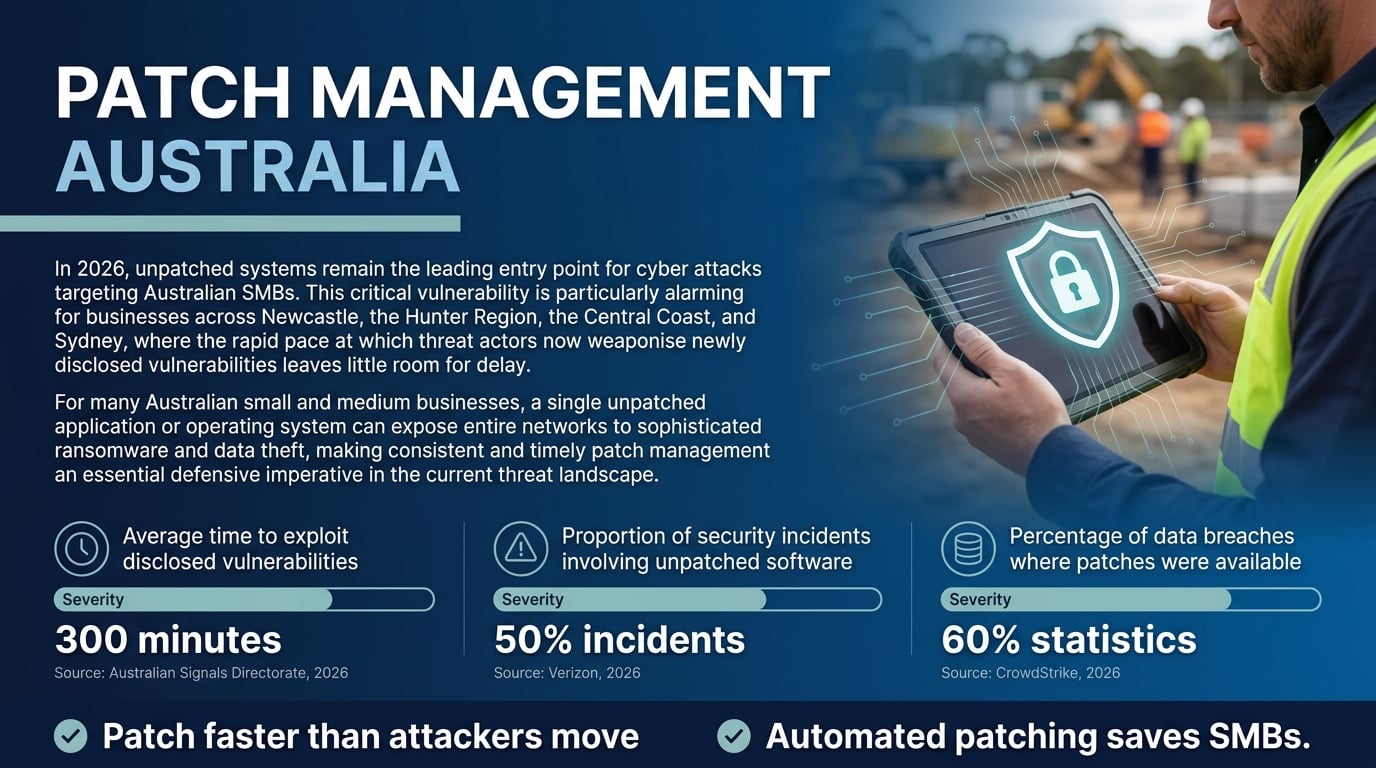
The threat landscape in 2026 is unforgiving. According to the Australian Signals Directorate, 2026, over 30% of cyber incidents reported involved exploitation of unpatched or known vulnerabilities in internet-facing systems. That is not a technical failure alone. It is an operational failure rooted in poor processes, limited resources, and common misconceptions about what patching actually requires.
Many SMBs operate under the belief that their current approach is adequate. They rely on manual checks, infrequent update cycles, or assume that antivirus software covers all their bases. Unfortunately, these assumptions are precisely what threat actors exploit. Understanding the five most critical mistakes is the first step toward closing the gap before a breach forces the issue.
Mistake 1: Treating Patching as a Monthly Task Instead of a Continuous Process
One of the most dangerous misconceptions among SMBs is scheduling patches on a fixed monthly calendar. In 2026, this approach is simply no longer viable. The CrowdStrike, 2026 Global Threat Report found that threat actors can now exploit a newly disclosed vulnerability in under five days. A monthly patching cycle leaves a window of weeks where a known exploit sits unaddressed on your network.
Effective patching requires a tiered, risk-based approach. Critical and high-severity patches should be deployed within 48 hours of release. This aligns directly with the Essential Eight Maturity Model published by the Australian Signals Directorate (ASD), which mandates specific timeframes for patching based on risk. Businesses in Newcastle and the Hunter Region seeking compliance with the Essential Eight should treat automated patch deployment as a baseline operational requirement, not an optional upgrade.
Moving from a scheduled to a continuous patching model also supports better visibility. When patches are reviewed and applied as they are released, IT teams maintain a clear picture of their vulnerability exposure at all times rather than operating with a month-long blind spot. For SMBs without dedicated IT staff, partnering with a managed IT Newcastle provider can bridge this gap immediately.
Mistake 2: Patching Workstations but Ignoring Network Devices and Firmware
Many SMBs focus their patching efforts entirely on end-user workstations and servers, leaving routers, firewalls, switches, and network-attached storage devices running outdated firmware for months or even years. These devices represent a significant and often overlooked attack surface. Threat actors actively scan for unpatched firmware vulnerabilities, particularly in small business networking equipment.
The challenge with network devices is that many SMBs simply forget they exist as patchable assets. Unlike workstations that prompt users for updates, routers and firmware rarely advertise available patches. This invisibility creates a false sense of security. IT security services in the Hunter Region consistently identify outdated firmware as one of the top vulnerabilities discovered during network assessments.
A comprehensive asset register that includes every networked device is essential. Each device should have a defined review cycle, with firmware updates applied as part of the broader patch management process. This is also closely tied to network segmentation practices, which reduce the blast radius of any compromise that does occur.
Mistake 3: No Tested Rollback Plan When a Patch Breaks Business Applications
A patch that breaks a critical business application can be just as disruptive as a cyberattack. This fear leads many SMBs to delay patching indefinitely, which is the exact wrong response. The solution is not to avoid patching. It is to implement a tested rollback plan so that patches can be applied with confidence and reversed quickly if problems arise.
A proper rollback strategy begins with verified backups taken immediately before any patch deployment. These backups must be tested regularly to confirm they can be restored within your business’s acceptable recovery timeframe. SMBs that have invested in solid ransomware recovery planning often find that this infrastructure doubles as their patch rollback safety net.
Testing patches in a staging environment before production deployment is best practice for larger SMBs with more complex application environments. Even for smaller businesses, deploying patches to a single test machine first and monitoring for 24 to 48 hours before rolling out broadly is a practical interim measure. The goal is confidence, not caution born of avoidance.
Mistake 4: Leaving Third-Party Software and Plugins Out of the Patch Cycle
Operating system patches from Microsoft or Apple receive most of the attention. However, third-party applications including browsers, productivity plugins, PDF readers, accounting software, and customer relationship management (CRM) tools are equally exploitable and far less consistently updated. According to the Verizon, 2026 Data Breach Investigations Report, 60% of data breaches in 2026 involved vulnerabilities for which a patch was already available at the time of the attack.
Third-party software represents a significant proportion of those avoidable breaches. Plugins and browser extensions in particular are frequently overlooked because they are not part of standard operating system update mechanisms. Businesses that use website content management systems, for example, often run outdated plugins for months without realising the exposure this creates.
Automated patch deployment tools designed for managed IT environments can scan for and update third-party applications alongside operating system patches. This is one area where the value of a managed service relationship becomes immediately clear. For SMBs on the Central Coast and Sydney that rely on diverse software ecosystems, a unified patch management approach covering all applications is the only reliable method. This concern also intersects with supply chain cyber attack risks, where compromised third-party software becomes an entry point into your network.
Mistake 5: Confusing Antivirus Updates With a Complete Patch Management Strategy
This is perhaps the most widespread misconception across Australian SMBs. Many business owners believe that because their antivirus definitions update automatically, their systems are effectively patched. Antivirus definition updates and software patching are fundamentally different processes that address entirely different threat vectors. Conflating the two leaves significant gaps in your security posture.
Antivirus updates refresh the list of known malware signatures the software can detect. Patching, by contrast, closes the actual vulnerabilities in operating systems and applications that allow malware to take hold in the first place. A system with current antivirus definitions but unpatched vulnerabilities can still be compromised by an exploit that bypasses detection entirely. For a deeper understanding of the gaps in endpoint protection, our guide on endpoint security critical gaps covers this in detail.
A complete security posture requires both layers working in concert with additional controls. The ASD Essential Eight Framework is the benchmark for Australian businesses. It treats application patching and operating system patching as two separate, distinct controls, each with its own maturity rating requirements. Treating antivirus as a substitute for either is a compliance failure as much as a security failure, particularly for organisations subject to the Privacy Act 1988 or pursuing ISO 27001 certification.
SMBs that have not yet reviewed their obligations under current privacy legislation should also read our breakdown of Privacy Act reforms for SMBs, which highlights how unpatched systems can directly contribute to notifiable data breach obligations.
“Unpatched vulnerabilities remain the single most consistent and preventable pathway into Australian business networks. The technology to close these gaps exists. The question is whether the process around it is mature enough to act on that technology reliably and quickly.”

Building a Stronger Approach to Patch Management in Australia
Effective patch management Australia is not a single tool or a one-time project. It is a continuous operational discipline that requires defined processes, appropriate tooling, trained accountability, and regular review. The five mistakes outlined above are all correctable, and none require enterprise-level budgets to address.
For SMBs that lack in-house IT expertise, a managed service arrangement provides immediate access to automated patch deployment, around-the-clock monitoring, and experienced engineers who understand both the technical and compliance dimensions of the problem. This is particularly relevant for businesses operating in regulated sectors or holding sensitive customer data under the Privacy Act 1988.
Businesses that invest in getting patching right also reduce their exposure across related risk areas. Improved patch hygiene directly supports better outcomes in dark web monitoring and incident response scenarios, since fewer unpatched vulnerabilities means fewer opportunities for credentials and access to be compromised in the first place.
Addressing patch management Australia-wide requires consistent standards, and the ASD’s Essential Eight provides the clearest roadmap available for Australian businesses of any size. Whether your organisation is just starting to formalise its patching process or looking to mature an existing programme, the five mistakes covered in this post offer a practical starting point for immediate improvement. To discuss your current patch management posture and how Adept IT Solutions can help, contact our team today.
Frequently Asked Questions
Q: How often should SMBs apply patches as part of a best-practice patch management Australia programme?
A: The ASD Essential Eight framework recommends that critical vulnerabilities in internet-facing systems be patched within 48 hours of a patch becoming available. For other high-severity vulnerabilities, patching within two weeks is the target. Monthly patching cycles are no longer considered adequate given that threat actors in 2026 can exploit newly disclosed vulnerabilities in under five days. Automated patch deployment tools managed by an IT security services provider are the most reliable way to meet these timeframes consistently.
Q: Does antivirus software cover unpatched vulnerabilities in my operating system or applications?
A: No. Antivirus definition updates and software patching are two separate security controls that address different risks. Antivirus software detects known malware signatures, while patching closes the underlying vulnerabilities that allow malware to execute in the first place. A system with current antivirus but unpatched software can still be compromised by exploits that bypass signature-based detection. Both controls are required as part of a layered security strategy, and neither substitutes for the other under the Essential Eight framework or ISO 27001 requirements.
Q: What network devices should be included in an SMB’s patching programme?
A: Every networked device that runs firmware or software capable of receiving updates should be included. This covers routers, firewalls, managed switches, wireless access points, network-attached storage (NAS) devices, printers, and any Internet of Things (IoT) devices connected to the business network. Many SMBs overlook these devices entirely because they do not prompt users for updates the way workstations do. Maintaining a complete asset register and assigning firmware review cycles to each device category is the foundation of a comprehensive approach.
Q: How can a small business in the Hunter Region afford proper automated patch deployment?
A: Automated patch deployment is routinely included as part of managed IT service agreements, making it accessible to SMBs without a dedicated in-house IT team. Rather than purchasing and operating separate patch management software, businesses in Newcastle and the broader Hunter Region can access enterprise-grade patching tools through a monthly managed service arrangement. This approach also provides access to experienced engineers who can manage rollback plans, test patch compatibility, and report on vulnerability exposure as part of a broader compliance posture.
Get in touch with our team of IT experts today! You can contact us via phone at 1300 423 378 or email us at info@adept-it.com.au.

