
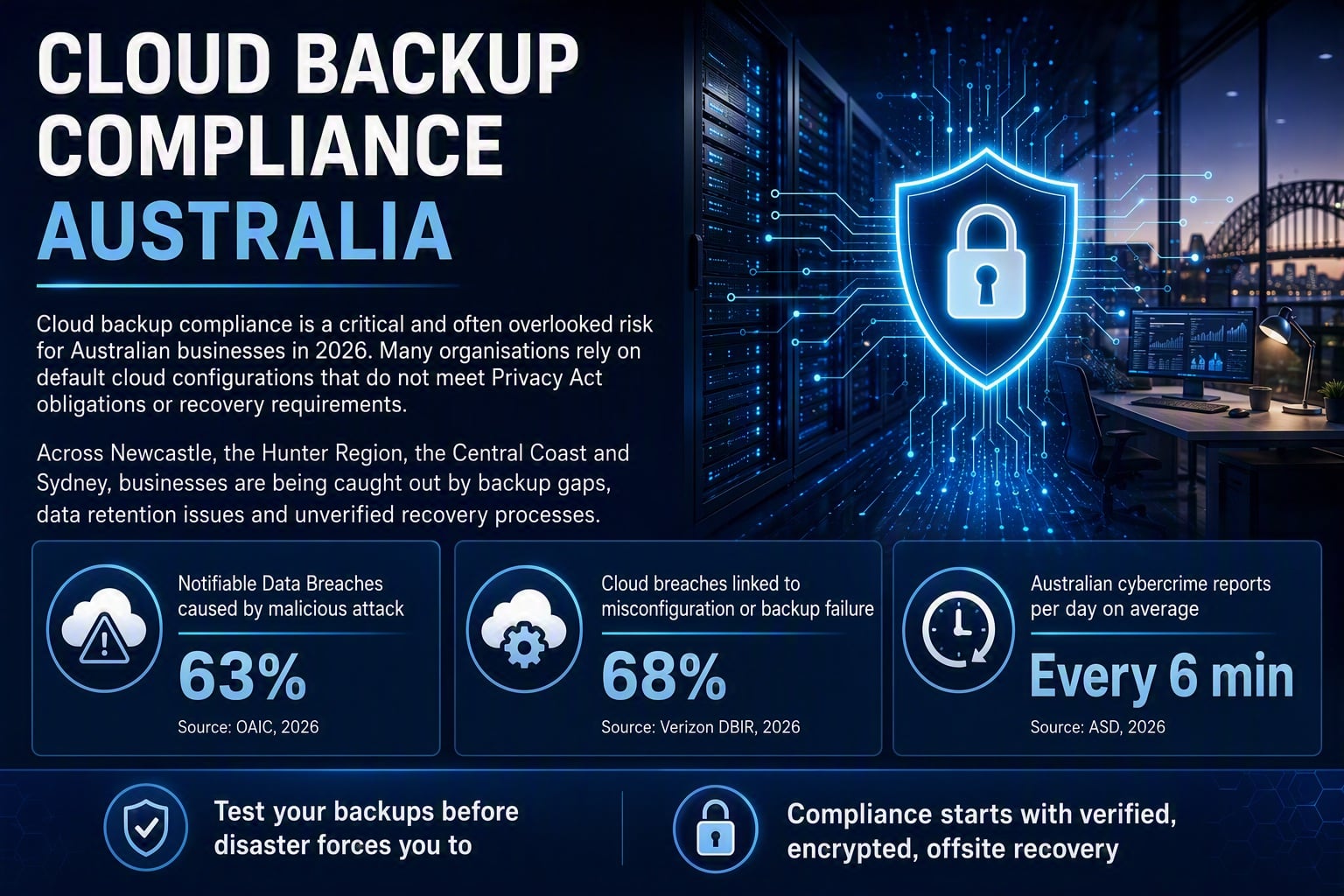
Cloud backup compliance Australia is one of the most frequently misunderstood obligations facing small and medium-sized businesses (SMBs) in 2026. Many business owners believe that moving data to the cloud automatically satisfies their backup and regulatory requirements. It does not. The Office of the Australian Information Commissioner, 2026 confirmed that malicious or criminal attacks remain the leading cause of Notifiable Data Breach (NDB) notifications, accounting for 63% of all reports, with many linked directly to inadequate backup and recovery controls. For SMBs across Newcastle, the Hunter Region, the Central Coast, and Sydney, the stakes have never been higher.
This post identifies eight critical mistakes that Australian SMBs are making with their cloud backup strategies in 2026, and explains what must change to achieve genuine compliance and resilience.

Mistake 1: Treating Cloud Storage as a Backup Solution
This is the single most prevalent error in cloud backup compliance Australia. Platforms such as Microsoft SharePoint, OneDrive, and Google Drive are synchronisation and collaboration tools. They are not purpose-built backup solutions. When a file is deleted or corrupted, that change synchronises across all connected devices within seconds.
A true backup solution maintains independent, versioned, immutable copies of data that cannot be overwritten or encrypted by ransomware. Without this distinction, businesses operating in Newcastle and across regional New South Wales are left exposed during any ransomware event or accidental deletion. Our guide to ransomware recovery for Australian SMBs explores why this distinction is critical to operational survival.
Mistake 2: Ignoring Privacy Act Compliance Obligations for Backup Data
The Privacy Act 1988 imposes clear obligations on how personal information is stored, retained, and protected, and those obligations extend fully to backup copies of data. Many SMBs fail to recognise that a backup containing customer records, health information, or financial data carries the same Privacy Act obligations as the live production database.
Retention schedules, access controls, and integrity protections must apply to backup environments. If personal data is retained in a backup beyond its required retention period, or stored without adequate protection, your business faces potential regulatory exposure. Our detailed post on Privacy Act reforms for Australian SMBs outlines the seven steps businesses must take to stay compliant in 2026.
Mistake 3: Never Testing Backup Restoration in a Live Scenario
A backup that has never been tested is not a backup. It is a hope. Surprisingly, the majority of SMBs across the Hunter Region and Central Coast configure their backup systems once and never validate them through a live restoration test. The first time they discover a problem is during an actual incident, when the pressure is highest and the cost of failure is greatest.
Backup and disaster recovery testing must be scheduled at least quarterly, with documented results. The Australian Signals Directorate, 2026 recorded a cybercrime report every six minutes on average, with ransomware-driven data destruction among the most frequently cited SMB impacts. Without tested recovery procedures, your defined Recovery Time Objective (RTO) means nothing. Review our complete guide to disaster recovery planning for Australian SMBs for a practical framework.
Mistake 4: Failing to Encrypt Backup Data at Rest and in Transit
Encryption is not optional in 2026. Yet many SMBs store backup data in cloud environments without enforcing encryption at rest, in transit, or both. An unencrypted backup containing sensitive customer data is a notifiable data breach waiting to happen.
The Verizon, 2026 Data Breach Investigations Report (DBIR) found that 68% of breaches involving cloud environments were attributable to misconfiguration or inadequate backup controls. Default cloud provider settings frequently do not enforce strong encryption. Businesses must validate that their backup vendor applies AES-256 encryption at rest and TLS 1.2 or higher in transit. Our guide on cloud security audits in Australia details exactly what to look for during a vendor review.
Mistake 5: Storing Backups in the Same Cloud Region as Primary Data
Geographic redundancy is a foundational principle of resilient cloud backup solutions. Storing backup data in the same cloud region, or even the same availability zone, as your primary production environment defeats the purpose of having a separate backup entirely. A regional outage, natural disaster, or targeted attack affecting that cloud zone eliminates both your live data and your backup simultaneously.
Australian businesses must ensure their backup provider replicates data to a geographically separate location, ideally within Australia to satisfy data sovereignty requirements under the Privacy Act. For businesses in Newcastle and the Hunter Region that rely on cloud infrastructure, this is a non-negotiable element of any compliant backup architecture. Proper network segmentation practices further reduce the blast radius of any incident affecting your primary environment.
Mistake 6: No Audit Trail for Backup Activity
Compliance frameworks including the Essential Eight and ISO 27001 require organisations to maintain verifiable evidence of their data protection activities. Without a comprehensive audit trail documenting every backup job, failure alert, restoration attempt, and access event, your business cannot demonstrate compliance to regulators, auditors, or cyber insurers.
Many SMBs across the Central Coast and Sydney rely on basic backup dashboards that display a green tick without generating exportable, tamper-evident logs. This is insufficient for formal compliance purposes. Audit trail gaps also complicate incident response, as investigators cannot establish what data existed, when it was last backed up, and who accessed the backup environment. See how cyber insurance coverage gaps often arise specifically from missing audit evidence.
Mistake 7: No Verified Offsite Backup Copy
The 3-2-1 backup rule remains the industry standard: three copies of data, on two different media types, with one copy stored offsite. Despite being a long-established best practice, a significant number of Australian SMBs maintain only a single cloud copy of their data, with no verified offsite or air-gapped secondary copy.
Ransomware operators have evolved their tactics specifically to target connected backup environments. If your backup solution is reachable from the same network as your primary systems, it is vulnerable to encryption alongside your production data. The ISACA guidance on data protection strongly recommends immutable, offsite backup copies as a core control. Businesses managing sensitive client data in Newcastle, the Hunter Region, or beyond must treat an offsite verified copy as mandatory, not optional.
Mistake 8: No Defined Recovery Time Objective or Recovery Point Objective
Cloud backup compliance Australia requires more than just backing up data. It requires knowing how quickly you can recover it, and how much data loss is acceptable. Without formally defined Recovery Time Objectives (RTOs) and Recovery Point Objectives (RPOs), businesses have no benchmark against which to measure their backup solution’s performance.
An RTO defines the maximum tolerable downtime after an incident. An RPO defines the maximum acceptable data loss, expressed in time. For example, a four-hour RPO means backups must run at least every four hours. Without these defined parameters, businesses frequently discover during a crisis that their backup frequency and recovery speed do not match their operational needs. The NIST Cybersecurity Framework identifies RTO and RPO definition as a foundational element of any recovery planning process. Businesses should also review their endpoint security posture alongside their backup strategy, as compromised endpoints are a primary vector for data backup failure.
“68% of breaches involving cloud environments were attributable to misconfiguration or inadequate backup controls.” The Verizon Data Breach Investigations Report 2026 makes clear that default cloud settings are not sufficient for Australian SMB compliance.

Strengthening Cloud Backup Compliance Australia-Wide: Next Steps
Cloud backup compliance Australia demands a proactive, structured approach that goes well beyond enabling a default cloud sync setting. The eight mistakes outlined in this post represent the most common points of failure for SMBs in 2026, and each one carries genuine regulatory, financial, and reputational consequences.
Businesses must audit their current backup architecture against the Privacy Act, Essential Eight, and relevant ISO 27001 controls. They must test restorations regularly, enforce encryption, maintain offsite copies, establish audit trails, and formally document their RTOs and RPOs. These are not aspirational targets. They are baseline expectations for any compliant Australian business in 2026.
Managed IT Newcastle businesses trust Adept IT Solutions to design backup and disaster recovery environments built for compliance from the ground up. Whether you are a professional services firm on the Central Coast or a growing SMB across Sydney, the time to address these gaps is before an incident occurs. To discuss your backup compliance requirements with our team, contact Adept IT Solutions today.
Frequently Asked Questions
Q: What does cloud backup compliance Australia actually require from an SMB?
A: Cloud backup compliance Australia requires SMBs to maintain encrypted, regularly tested, geographically redundant backup copies of all business and personal data, with retention schedules and access controls that align with the Privacy Act 1988. Businesses must also document their Recovery Time Objectives and Recovery Point Objectives, maintain audit trails of all backup activity, and ensure their backup environment is separate from their primary production systems. Compliance is not achieved simply by enabling a cloud storage subscription.
Q: Is Microsoft 365 OneDrive sufficient as a backup and disaster recovery solution for my business?
A: No. Microsoft OneDrive and SharePoint are file synchronisation and collaboration platforms, not purpose-built backup and disaster recovery solutions. They do not maintain immutable, versioned copies that are fully isolated from ransomware or accidental deletion. Australian SMBs should deploy a dedicated third-party backup solution alongside Microsoft 365 to ensure genuine data protection and regulatory compliance.
Q: How often should Australian SMBs test their cloud backup restoration process?
A: Restoration testing should be conducted at minimum on a quarterly basis, with documented results retained for compliance and audit purposes. Businesses operating in regulated industries or handling sensitive personal data should consider monthly testing cycles. Each test should validate that specific files, systems, or databases can be fully restored within the organisation’s defined Recovery Time Objective. A backup that has never been tested cannot be relied upon during a real data backup failure event.
Q: Does storing backup data overseas create a Privacy Act compliance risk for Australian businesses?
A: Yes. Under the Privacy Act 1988, Australian Privacy Principle 8 governs the cross-border disclosure of personal information. If backup data containing personal information is stored on servers located offshore, the Australian entity remains accountable for ensuring that overseas storage meets equivalent privacy protections. Many SMBs use cloud backup solutions without verifying where data is physically stored. Choosing an Australian-hosted backup solution with clearly documented data sovereignty guarantees is the safest approach for Privacy Act compliance.
Get in touch with our team of IT experts today! You can contact us via phone at 1300 423 378 or email us at info@adept-it.com.au.

